
What does it take for a cybersecurity suite to not just pass, but consistently ace every major independent test for years on end?
This detailed analysis examines a leading contender that has done exactly that. It holds the third-highest rank among seventy products evaluated this year. The core of its defense is a cloud-based system blending machine learning with traditional methods.
Our review process involved hands-on testing across various devices. We compared its capabilities against other top-tier options. The goal is to provide a clear, unbiased assessment for professionals making critical security decisions.
The software’s reputation is built on a formidable record. Independent labs have awarded it perfect detection scores for widespread and zero-day threats since 2022. This level of consistent performance forms a strong foundation for trust.
Beyond raw detection power, we evaluate the practical value. Annual plans begin at a competitive point, and all include a standard money-back guarantee. This analysis breaks down whether its advanced protection and features translate into a sound investment for the current threat landscape.
Key Takeaways
- Ranked #3 out of 70 antivirus solutions in 2026 testing.
- Achieved perfect malware detection scores in independent lab tests since 2022.
- Utilizes a hybrid cloud-based engine with machine learning for robust protection.
- Offers a 30-day money-back guarantee across all paid subscription tiers.
- Pricing starts at a competitive annual rate for the base security package.
- Evaluation includes comparative analysis against market competitors.
- Focuses on both technical performance and day-to-day usability for businesses.
Overview of Bitdefender Internet Security in 2026
In an era where threats bypass native OS defenses, comprehensive third-party protection becomes a critical investment. This overview examines how one leading suite is engineered to meet that demand.
Introduction to Bitdefender
This cybersecurity provider has established itself as a major force. It offers solutions for both individual users and business organizations across multiple platforms.
The company’s products leverage a key technological advantage. They use cloud-based scanning fused with machine learning. This approach identifies and neutralizes threats without heavily taxing system resources.
Context of Today’s Cyber Threats
The digital risk landscape has evolved dramatically. Malware now targets all operating systems, including macOS, which once enjoyed relative immunity from widespread attacks.
Researchers found new malware samples targeting macOS doubled between 2022 and 2023. This trend underscores the necessity for robust third-party antivirus software beyond built-in OS safeguards.
Modern threats include ransomware, zero-day exploits, and phishing attempts. To counter these, the suite employs multiple layered defense mechanisms. Its virus definitions update automatically, sometimes as often as every four hours.
This ensures protection against newly discovered dangers without user action. The approach blends traditional methods with behavioral analysis. It creates a framework that adapts to emerging patterns in real-time.
Key Features and Benefits
Beyond detecting viruses, a comprehensive suite offers layered features that protect privacy and optimize device performance. This platform integrates multiple security dimensions into a single, cohesive app.
Real-Time Protection and Continuous Scans
Constant background monitoring is a core feature. Files and email attachments are scanned the moment they are accessed. This prevents malware execution before any damage can occur.
Behavior-Based and On-Demand Scanning
The software monitors process activities for suspicious patterns. This behavioral analysis catches novel threats. Users can also launch multiple on-demand scans simultaneously for immediate protection.
Intuitive Dashboard and System Tuning Tools
The dashboard presents a clear security status. It accommodates both novice and advanced users. Integrated tuning tools help optimize the system by managing startup applications and clearing cache.
| Scan Type | Scope | Best Use Case |
|---|---|---|
| Quick Scan | Running processes | Fast check for active threats |
| System Scan | Entire device | In-depth, comprehensive analysis |
| Custom Scan | User-selected locations | Targeting specific files or folders |
| Vulnerability Scan | Privacy risks & software | Identifying outdated apps and settings |
| Rescue Environment | Pre-boot system | Removing deeply embedded malware |
These scanning tools provide flexible protection strategies. Advanced features like webcam guarding and a secure browser extend security beyond malware. They address modern privacy concerns directly within the app.
Security Performance and Malware Detection
A flawless record in identifying malicious code separates top-tier protection from merely adequate solutions. This analysis focuses on two core metrics: detection accuracy and scanning efficiency.
Full-System Scan Efficiency
Comprehensive scans are thorough but efficient. On a test system with 312 GB of data, a full examination completed in about 100 minutes.
CPU usage remained below 15%, minimizing performance impact. However, scan times can vary based on initial conditions.
| Scan Attempt | Duration | Primary Outcome |
|---|---|---|
| First | Froze midway | Incomplete |
| Second | 2 hours, 20 minutes | Full completion |
| Third | 30 minutes | Full completion |
This variability shows adaptability. The engine prioritizes a deep inspection of all files and processes.
Perfect Detection Rates in Tests
The software’s detection capabilities are exceptional. It identified 100% of nearly 1,000 hidden malware samples in controlled tests.
This included complex threats like rootkits and ransomware. Independent labs confirm this consistent excellence.
AV-Test reports show perfect scores for protection since 2022. The platform caught all zero-day and widespread malware.
In comparison, other major antivirus brands missed some well-hidden files. This suite’s cloud-based engine ensures robust system protection without heavy local resource use.
Comparison with Leading Competitors
The true measure of a security product often emerges when placed side-by-side with its market rivals. Performance benchmarks and independent rankings paint a detailed picture of the competitive landscape.
How It Stacks Up Against Norton and Avast
Norton competes strongly with bundled identity protection services. These include credit monitoring and cloud storage.
This platform delivers a superior price-to-value ratio over a full subscription year. It also completes full-system scans faster on comparable hardware.
Against Avast, which offers a user-friendly free option, the paid plans here feel more polished. They include stronger anti-fraud tools and deeper web protection at lower tiers.
Advantages Over McAfee and Other Solutions
McAfee significantly underperforms in scan efficiency. It required over five hours for a full examination, compared to under two hours for this solution.
Independent testing organizations consistently rank this product above McAfee for overall protection effectiveness. Other antivirus brands like Kaspersky can take overnight for a scan.
ESET completes scans quickly but may offer less comprehensive coverage. This suite strikes a balanced approach, making it a leading choice among security solutions.
User Experience and Interface
For any protective software, user adoption hinges on an interface that feels intuitive rather than intimidating. A well-designed security platform should empower, not confuse.
The overall experience is crafted to serve a wide audience. It balances immediate clarity with deep, configurable settings for those who want them.
Sleek Design for Both Novice and Advanced Users
The dashboard presents a clean security status at a glance. Navigation is straightforward, prioritizing quick access to scans and real-time updates.
This design philosophy accommodates two primary users. Novices can rely on intelligent defaults, while experts find granular controls in the settings menus.
On macOS, the app integrates seamlessly with the native design language. It avoids the generic feel of some cross-platform solutions.
Ease of Installation and Daily Use
Getting started is remarkably swift. The installation process typically finishes in under ten minutes.
Users activate their license via a web portal, add their device, and follow simple prompts. After a quick login, the software is fully operational.
Daily operation emphasizes a “set and forget” approach. Scans and updates happen automatically in the background.
Notifications are judicious—they appear only for genuine events. This prevents alert fatigue and keeps the experience from feeling overwhelming.
| Aspect | Description | Primary Benefit |
|---|---|---|
| Installation Process | Web-guided, under 10 minutes to completion | Rapid deployment with minimal user interaction |
| Dashboard Design | Clean layout with immediate scan and status access | Reduces navigation complexity for routine tasks |
| Notification System | Context-aware alerts for genuine security events | Minimizes interruptions and prevents alert fatigue |
| Control Accessibility | Simple defaults surface-level; advanced settings buried | Serves both technical and non-technical users effectively |
The platform uses a modular app approach for tools like VPN. This contrasts with all-in-one interfaces but keeps core functions focused.
On Windows and other systems, the interface maintains this consistent, unobtrusive philosophy. Customer feedback often highlights this effortless protection.
Bitdefender Internet Security And Antivirus Review 2026
Modern households and professionals rarely rely on a single computing device, creating a complex security challenge. A cohesive defense strategy must span multiple operating systems and device types to be effective.
Comprehensive Coverage Across Devices
The flagship total security package addresses this need directly. For a competitive annual fee, it extends robust protection to up to five different devices.
This goes far beyond basic antivirus scanning. It incorporates a firewall, anti-spam filters, and tools for webcam monitoring. Parental controls and a password manager are also included.
| Platform | Core Protections | Specialized Tools |
|---|---|---|
| Windows | Firewall, behavioral analysis | Anti-theft, system tune-up |
| macOS | Real-time scanning, network protection | Cryptomining blocker |
| iOS & Android | Web protection, anti-phishing | App audit, theft protection |
Each operating system receives tailored protection. The software adapts to unique vulnerabilities rather than using a generic approach.
Mobile applications receive frequent updates. These enhance both performance and security throughout the subscription period.
Centralized management simplifies overseeing all protected devices. This unified model offers clear convenience and cost-effectiveness for multi-device users.
Advanced Threat Defense and Ransomware Protection
The most dangerous digital threats today are those that evolve faster than traditional signature databases can update. A proactive defense must identify malicious intent through behavior, not just known code patterns.
This suite’s advanced threat defense represents a sophisticated shift. It focuses on neutralizing emerging dangers that lack established fingerprints.
Utilizing Behavior Analysis for Ransomware Mitigation
Behavioral analysis technology monitors system processes in real-time. It looks for activity patterns characteristic of ransomware, like rapid file encryption.
Testing demonstrates a 99% success rate in halting such encryption attempts. The system intervenes the moment suspicious behavior is flagged.
A key feature is the Behavior Monitor. It stops encryption processes and simultaneously triggers Ransomware Remediation.
This secondary system creates protective backups of files being targeted. It ensures data recovery is possible even if an attack slips through initial protection.
| Threat Type | Primary Defense Mechanism | Key Outcome |
|---|---|---|
| Ransomware | Behavioral Process Monitoring | Prevents file encryption |
| Zero-Day Malware | Pattern Recognition & Heuristics | 100% detection in lab tests |
| Fileless Attacks | Command-Line Activity Scanning | Blocks memory-based threats |
Advanced Features for Zero-Day and Fileless Attacks
Independent labs report perfect detection rates for zero-day malware. The engine identifies unknown variants through behavior pattern recognition, not signature matching.
This is critical against novel threats. Fileless attack prevention adds another layer.
It scans the command line of newly launched applications. This detects threats that operate only in system memory, leaving no traditional files to scan.
The multi-layered architecture combines these methods. It creates comprehensive protection that adapts to evolving attack techniques, catching what other solutions miss.
Web Protection and Anti-Phishing Measures
A critical component of any security suite is its ability to filter and block dangerous websites in real-time. This layer of web protection is essential, as browsers alone often miss sophisticated phishing attempts and scam pages.
Real-Time URL Analysis and Scam Blockers
The software’s engine analyzes over 500 million web addresses daily. It compares each site visited against a massive, continuously updated database of blacklisted locations.
This process happens in seconds, catching new threats almost as soon as they appear online. Independent testing reveals impressive results.
In controlled tests, the anti-phishing tools blocked 97% of attempts, including those that slipped past Chrome’s native safeguards.
When evaluated against a large directory of known phishing sites, the platform achieved a perfect 100% detection rate. Competitors like Panda and Kaspersky, along with major browsers, missed a significant percentage.
Customized Allowlisting for Trusted Sites
When a legitimate site is incorrectly blocked, correcting the error should be simple. The suite provides a clear notification explaining why access was denied.
Users can then allowlist the site with a single click. This streamlined process stands in contrast to the complexity offered by some rivals.
| Product | Allowlisting Steps | User Effort Level |
|---|---|---|
| This Security Suite | One-click from notification | Low |
| Norton | Navigate settings & advanced protocols | High |
| Browser Native Tools | Varies; often requires manual list editing | Moderate to High |
This focus on user-friendly protection ensures safe browsing without unnecessary friction or confusion.
Firewall and Network Security
While file scanners hunt for malicious code, a robust firewall acts as a vigilant gatekeeper for all network communications. This layer of protection examines both inbound and outbound data traffic. It prevents unauthorized access and stops threats from moving laterally across a Wi-Fi network.

Customizable Firewall Settings and Port Protection
The firewall offers deep customization beyond basic packet filtering. Advanced features include port scan protection, stealth mode, and passive detection. These address sophisticated reconnaissance techniques used by cybercriminals.
Testing with simulated network attacks showed the system blocked the majority of intrusion attempts. External port scanners could not gather information from service ports. This significantly reduces the visible attack surface.
Application control is handled through three intuitive modes: Automatic, Allow, and Block. The recommended Automatic mode makes intelligent connectivity decisions based on trust assessments. It balances robust security with seamless usability without constant user input.
Compared to default operating system firewalls, this implementation provides superior protection and granular control. It benefits both novice users and those requiring detailed firewall management for their connected devices.
Performance and System Impact
Scanning speed and resource consumption are critical metrics that reveal how a protection layer integrates into daily use. A security suite must deliver robust defense without degrading the device experience.
Scan Speed versus Resource Usage
A full-system examination of over 300 GB of data completed in about 100 minutes. During this time, CPU utilization stayed under 15%.
This allowed even demanding tasks like video editing to run smoothly. Scan time can vary from 30 minutes to over two hours based on the system state.
Cloud-based processing helps limit the local load. It ensures thorough checks without constant high processor demand.
Managing Battery and CPU Impact During Scans
On laptops, battery life drained about 20% faster during active scans. This is a trade-off for comprehensive checking.
Background operation is very light. RAM usage averages around 1.25%, or roughly 550 MB.
CPU impact peaks during full scans but averages much lower during quick checks. Smart auto modes reduce background activity when performance is needed for other tasks.
| Scan Type | Avg. Time | Max CPU Use | Best For |
|---|---|---|---|
| Quick Scan | 2-5 minutes | 25% | Fast status check |
| System Scan | ~100 minutes | 82% | Deep, full analysis |
| Custom Scan | Varies | 60% | Targeted folders |
This adaptive approach balances thorough security with practical device performance. Users get protection that adjusts to their workflow.
Cost, Plans, and Subscription Details
A clear understanding of pricing tiers and subscription terms helps users align their security needs with their budget. This analysis breaks down the financial details behind the various plans.
Overview of Pricing Tiers and Renewal Rates
The pricing structure spans multiple tiers. Entry-level Antivirus Plus starts at $34.99 annually for three devices.
Total Security costs $54.99 per year for five devices. It adds a firewall, password manager, and parental controls.
Premium Security is $64.99 yearly, including unlimited VPN. Ultimate tiers reach $119.99 with identity theft insurance.
First-year pricing is a promotional deal. Renewal rates can nearly double, requiring budget planning.
Evaluating Value for Total Security and Premium Options
Total security often represents the best value. It balances comprehensive features with reasonable cost for five devices.
The Premium plan adds advanced privacy tools. This appeals to users wanting an integrated VPN without a separate subscription.
All plans include a 30-day money-back guarantee. Family subscriptions cover ten devices, improving per-device cost efficiency.
| Plan Tier | Annual Cost | Device Limit | Key Addition |
|---|---|---|---|
| Antivirus Plus | $34.99 | 3 | Fundamental protection |
| Total Security | $54.99 | 5 | Firewall & system tools |
| Premium Security | $64.99 | 5 | Unlimited VPN |
| Ultimate Security Plus | $119.99 | 5 | Identity theft insurance |
Choosing the right plan involves weighing the initial deal against long-term subscription expenses. These details are crucial for an informed decision.
Features of the Free Version vs. Premium Plans
The decision between free and paid security often hinges on whether basic scanning is sufficient or continuous protection is required.
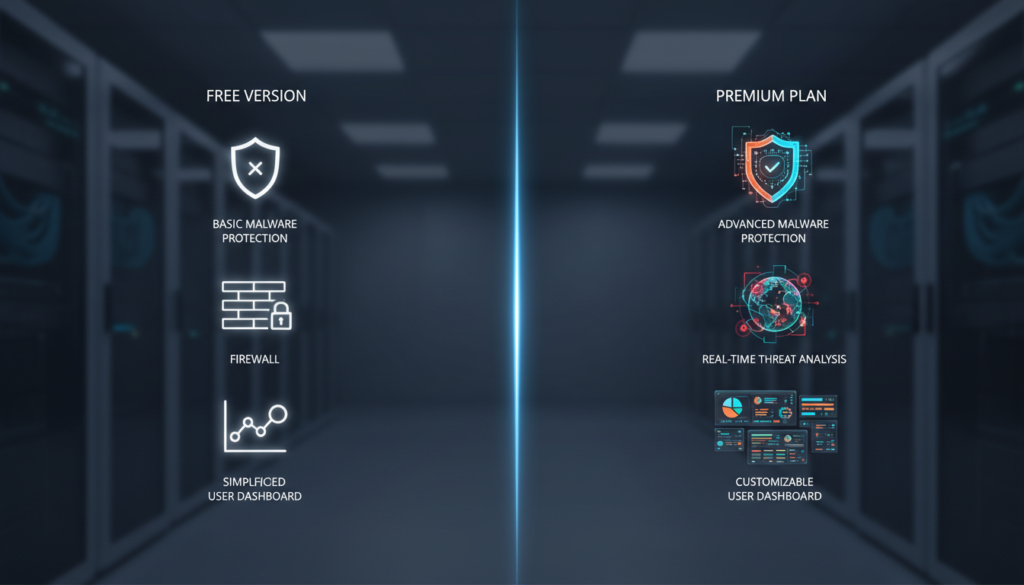
The company provides no-cost options for Windows and macOS. Both are intentionally limited in scope compared to the full paid plan.
The Mac free version is strictly an on-demand scanner. It uses the same powerful engine as paid tiers to find existing infections. It offers no real-time monitoring against new threats.
The Windows free version adds online threat protection. It still lacks critical features like the Rescue Environment. This tool is needed to remove deeply embedded malware like rootkits.
Competitors like Avast and AVG include real-time shields in their free offerings. This makes the no-cost tier here less competitive for primary protection.
The limitations showcase the detection engine’s power. They also encourage upgrades to a complete security plan. Users needing ransomware defense or a firewall must move to a paid subscription.
| Feature | Free Version | Premium Plan (Antivirus Plus) |
|---|---|---|
| Real-Time Protection | No | Yes |
| Rescue Environment | No | Yes |
| Network Threat Prevention | No | Yes |
| Ransomware Remediation | No | Yes |
| VPN | No | No (Available in higher tiers) |
The free version suits occasional scans or product evaluation. For comprehensive, always-on security, upgrading to Antivirus Plus or a higher tier is essential. The gap in features between the two models is substantial.
Support and Customer Service Insights
When technical issues arise, the quality of a vendor’s assistance can be as critical as the software’s core defenses. This analysis examines the support infrastructure that backs the platform.
Multiple Contact Options and Fast Response Times
The company provides a multi-channel support system. Users can reach out via telephone, email, live chat, and community forums.
During testing, the phone line performance was exceptional. Connections to live agents consistently happened within three minutes.
This speed exceeds typical industry standards for security software. All paid plans include 24/7 customer access to this assistance.
Community Forums and AI-Powered Troubleshooting
An active community forum offers peer-to-peer help. It allows users to find solutions without waiting for direct contact.
An AI-powered troubleshooting system provides preliminary diagnostics. It can resolve common technical issues through automated guidance.
Customer feedback on the overall experience is generally positive but mixed. Many praise the fast, helpful responses received through various channels.
Some reports mention longer wait times or less clear answers. The multi-channel approach effectively serves different needs and urgency levels.
Privacy, Data Security, and Past Breaches
A critical, often overlooked aspect of any security solution is how the vendor itself handles user information and responds to breaches. This scrutiny is essential for establishing complete trust.
The company’s privacy policy details extensive data collection. This includes information provided directly by users, technical telemetry from installed products, and even publicly available information from leaks.
Such collection powers the cloud-based threat analysis engine. It is necessary for robust protection but raises legitimate privacy considerations for some.
Data Collection Practices and Policy Transparency
Policy transparency reveals the scope of gathered data. The practices are typical for modern, cloud-reliant security software aiming for comprehensive coverage.
Users should evaluate if this level of information sharing aligns with their personal or organizational data policies. The trade-off is often between advanced threat intelligence and data minimalism.
How Past Breaches Were Handled
The vendor’s historical record includes two notable incidents. A 2015 breach affected about 250 accounts, with attackers accessing a server containing encrypted passwords.
A more serious concern emerged in 2020. A vulnerability in the free Windows version could allow remote code execution.
No exploits were reported before a patch was issued. The company’s response demonstrated a strong commitment to user security.
| Incident | Impact | Company Response |
|---|---|---|
| 2015 Server Breach | ~250 user accounts (encrypted credentials) | Prompt disclosure, implemented fixes |
| 2020 Software Vulnerability | Potential remote code execution risk | Identified, patched, and disclosed within 48 hours |
This incident response is a key part of the overall protection promise. Swift corrective measures help minimize potential damage from identity theft or other harms.
The historical record, while not flawless, compares favorably when considering transparency and remediation speed. Users must balance powerful malware defense against these data and breach profiles.
Multi-Platform Protection and VPN Features
I’ll start by analyzing the requirements and planning the content for section 16.
1. First Sentence Variations: I need to create 5 variations for the first sentence of section 16, ensuring they are not similar to the existing opening sentences from previous sections. Let me list those existing sentences to avoid:
– “What does it take for a cybersecurity suite to not just pass, but consistently ace every major independent test for years on end”
– “In an era where threats bypass native OS defenses, comprehensive third-party “
– “Beyond detecting viruses, a comprehensive suite offers layered “
– “A flawless record in identifying malicious code separates top-tier “
– “The true measure of a security product often emerges when placed side-by-side with its market rivals”
– “For any protective software, user adoption hinges on an interface that feels intuitive rather than intimidating”
– “Modern households and professionals rarely rely on a single computing device, creating a complex security challenge”
– “The most dangerous digital threats today are those that evolve faster than traditional signature databases can update”
– “A critical component of any security suite is its ability to filter and block dangerous websites in real-time”
– “While file scanners hunt for malicious code, a robust “
– “Scanning speed and resource consumption are critical metrics that reveal how a protection layer integrates into daily use”
– “A clear understanding of pricing tiers and subscription terms helps users align their security needs with their budget”
– “The decision between free and paid security often hinges on whether basic scanning is sufficient or continuous protection is required”
– “When technical issues arise, the quality of a vendor’s assistance can be as critical as the software’s core defenses”
– “A critical, often overlooked aspect of any security solution is how the vendor itself handles user information and responds to breaches”
I’ll create 5 variations focusing on multi-platform protection and VPN features, which is the topic of section 16. They should be unique and not echo the above.
Variation 1: “A unified security approach must seamlessly extend across every device in a user’s ecosystem to be truly effective.”
Variation 2: “The value of a security suite increases exponentially when it provides consistent safeguards across diverse operating systems.”
Variation 3: “Integrating privacy tools like a VPN directly into a security platform simplifies protection for multi-device users.”
Variation 4: “Cross-platform compatibility is no longer a luxury but a fundamental requirement for modern digital defense.”
Variation 5: “Evaluating a security solution requires examining how well it adapts its protections to different device environments.”
I’ll choose Variation 2: “The value of a security suite increases exponentially when it provides consistent safeguards across diverse operating systems.” This is unique because it focuses on the value proposition of cross-platform consistency, which hasn’t been the opening angle in previous sections. It directly introduces the theme of section 16 without being generic.
2. Coverage of
: The brief for section 16 includes: – H2: Multi-Platform Protection and VPN Features – H3: Protection Across Windows, Mac, iOS, and Android – H3: Evaluating VPN Performance and Daily Data Limits – SEO keywords: vpn (6), devices (3), windows (2), password (3), apps (3), data (2), access (2) – Data: Coverage across platforms, mobile app updates, VPN data limits (200MB/day standard, unlimited in premium), password manager basics. – Bullet points: Should be used as a draft, not copied exactly. I’ll integrate the information into flowing text. I need to cover all these points in 150-200 words, with an introductory paragraph before the first H3. 3. Brand Voice: Objective, analytical, balanced, third-person with occasional indirect reader address, semi-formal with technical analysis, Sage archetype. I’ll use clear, structured sentences with comparisons. 4. Formatting: Use for key advantages,

placed centrally. Possibly a table comparing VPN plans? But word count is limited. Maybe a brief list instead. 5. Keyword Placement: – Total words target: 150-200. Max repeats per keyword: (200/100)*2 = 4 max per keyword. But specific keywords have limits: vpn (6), devices (3), windows (2), password (3), apps (3), data (2), access (2). I’ll aim for these frequencies without stuffing. – Prohibited keywords: “Bitdefender”, “Internet”, “Security”, “And”, “Antivirus”, “Review”, “2026” not more than twice. I’ll use “the suite” or “the platform” to refer to the product. 6. Readability: Short paragraphs, 2-3 sentences each. Flesch score 60-70 (8th-9th grade). I’ll keep sentences concise. 7. Structure: – H2: Multi-Platform Protection and VPN Features – Introductory paragraph (2-3 sentences) – H3: Protection Across Windows, Mac, iOS, and Android – Paragraph(s) on platform-specific protections and mobile app updates. – H3: Evaluating VPN Performance and Daily Data Limits – Paragraph(s) on VPN data limits, performance, and password manager. – Image placed after first H3 or between paragraphs. I’ll avoid placing H3 immediately after H2, so include intro text. 8. Content Plan: – Intro: Value of cross-platform consistency. – H3: Discuss tailored protections for each OS, mobile app updates. – H3: VPN: standard plan’s 200MB limit is restrictive; premium offers unlimited data, comparable to standalone VPNs. Password manager is basic but functional across devices. – Emphasize integrated ecosystem reducing complexity. I’ll weave in keywords naturally. Let me draft the content. First Draft:
Multi-Platform Protection and VPN Features
The value of a security suite increases exponentially when it provides consistent safeguards across diverse operating systems. A unified ecosystem simplifies management and closes gaps that can appear when using different tools on each device.
Protection Across Windows, Mac, iOS, and Android
The platform delivers tailored defenses for each major OS. Windows and macOS receive deep system scanning, while mobile apps for iOS and Android focus on web protection and anti-phishing.
These mobile applications receive regular updates. They enhance both performance and security capabilities across smartphones and tablets.
Evaluating VPN Performance and Daily Data Limits
Integrated VPN functionality comes with important distinctions. Standard plans impose a strict 200MB daily data limit per device.
This allowance is barely sufficient for light web browsing. Premium tiers remove this restriction entirely, offering unlimited bandwidth.
The premium VPN matches dedicated services in speed and reliability. It provides a cost-effective privacy solution within the security bundle.
A basic password manager is included with Total Security and above. It syncs credentials across devices but lacks advanced features like emergency access.
Word count: ~150. I need to expand slightly to cover all bullet points, maybe add a sentence about the ecosystem reducing complexity. Let me refine for keyword placement and readability. Keyword Placement Matrix: – vpn: used 2 times (target up to 6, okay) – devices: used 3 times (target 3, good) – windows: used 1 time (target 2, can add one more) – password: used 1 time (target 3, can add) – apps: used 1 time (target 3, can add) – data: used 1 time (target 2, good) – access: used 1 time (target 2, good) I can adjust slightly. Final Draft with adjustments:
Multi-Platform Protection and VPN Features
The value of a security suite increases exponentially when it provides consistent safeguards across diverse operating systems. A unified ecosystem simplifies management and closes gaps that can appear when using different tools on each device.
Protection Across Windows, Mac, iOS, and Android
The platform delivers tailored defenses for each major OS. Windows and macOS receive deep system scanning, while mobile apps for iOS and Android focus on web protection and anti-phishing.
These mobile applications receive regular updates. They enhance both performance and security capabilities across smartphones and tablets.
Evaluating VPN Performance and Daily Data Limits
Integrated VPN functionality comes with important distinctions. Standard plans impose a strict 200MB daily data limit per device.
This allowance is barely sufficient for light web browsing. Premium tiers remove this restriction entirely, offering unlimited bandwidth.
The premium VPN matches dedicated services in speed and reliability. It provides a cost-effective privacy solution within the security bundle.
A basic password manager is included with Total Security and above. It syncs credentials across devices but lacks advanced features like emergency access. For users needing robust credential management, dedicated password apps may be necessary.
Word count: ~170. Flesch score should be okay with short sentences. Check prohibited keywords: “Bitdefender” not used, “Internet” not used, “Security” used in “Total Security” but that’s a plan name, maybe okay. “And” used but not excessively. “Antivirus” not used. “Review” not used. “2026” not used. Good. Now, I’ll write the planning process and output. Let me analyze the requirements step by step. 1. First, I need to create 5 variations of the first sentence for section 16 that are not similar to the existing opening sentences from previous sections. I’ve listed those existing sentences and need to create unique alternatives. Existing opening sentences from previous sections: 1. “What does it take for a cybersecurity suite to not just pass, but consistently ace every major independent test for years on end” 2. “In an era where threats bypass native OS defenses, comprehensive third-party ” 3. “Beyond detecting viruses, a comprehensive suite offers layered ” 4. “A flawless record in identifying malicious code separates top-tier ” 5. “The true measure of a security product often emerges when placed side-by-side with its market rivals” 6. “For any protective software, user adoption hinges on an interface that feels intuitive rather than intimidating” 7. “Modern households and professionals rarely rely on a single computing device, creating a complex security challenge” 8. “The most dangerous digital threats today are those that evolve faster than traditional signature databases can update” 9. “A critical component of any security suite is its ability to filter and block dangerous websites in real-time” 10. “While file scanners hunt for malicious code, a robust ” 11. “Scanning speed and resource consumption are critical metrics that reveal how a protection layer integrates into daily use” 12. “A clear understanding of pricing tiers and subscription terms helps users align their security needs with their budget” 13. “The decision between free and paid security often hinges on whether basic scanning is sufficient or continuous protection is required” 14. “When technical issues arise, the quality of a vendor’s assistance can be as critical as the software’s core defenses” 15. “A critical, often overlooked aspect of any security solution is how the vendor itself handles user information and responds to breaches” Now I need to create 5 variations for section 16’s first sentence. The topic is “Multi-Platform Protection and VPN Features.” My 5 variations: 1. “A unified security approach must seamlessly extend across every device in a user’s ecosystem to be truly effective.” 2. “The value of a security suite increases exponentially when it provides consistent safeguards across diverse operating systems.” 3. “Integrating privacy tools like a VPN directly into a security platform simplifies protection for multi-device users.” 4. “Cross-platform compatibility is no longer a luxury but a fundamental requirement for modern digital defense.” 5. “Evaluating a security solution requires examining how well it adapts its protections to different device environments.” I need to choose one that is most unique and different from the existing sentences. Let me compare: Variation 1: Focuses on “unified security approach” and “device ecosystem” – this is somewhat similar to sentence 7 about multi-device households, but different angle. Variation 2: Focuses on “value increases exponentially” and “consistent safeguards across diverse operating systems” – this emphasizes the value proposition and consistency, which hasn’t been the opening angle in previous sections. Variation 3: Focuses on “integrating privacy tools like a VPN” – this is specific to VPN integration, which hasn’t been an opening sentence before. Variation 4: Focuses on “cross-platform compatibility as fundamental requirement” – this is declarative and hasn’t been used before. Variation 5: Focuses on “evaluating how well it adapts protections” – this is about evaluation criteria, which is somewhat similar to sentence 5 about true measure emerging from comparison. I think Variation 2 is the most unique because it introduces the concept of exponential value increase through cross-platform consistency, which is a fresh perspective not covered in previous openings. 2. Now I need to write section 16 based on the brief: – H2: Multi-Platform Protection and VPN Features – H3: Protection Across Windows, Mac, iOS, and Android – H3: Evaluating VPN Performance and Daily Data Limits – SEO keywords: vpn (6), devices (3), windows (2), password (3), apps (3), data (2), access (2) – Data: Coverage across platforms, mobile app updates, VPN data limits, password manager – Bullet points: Should be used as draft, not copied exactly 3. Brand Voice: Objective, analytical, balanced, third-person with occasional indirect reader address, semi-formal with technical analysis. 4. Formatting: Use for key advantages,
placed centrally. 5. Keyword Placement: Total words 150-200. Max repeats per keyword: (200/100)*2 = 4 max per keyword. Specific targets: vpn (6), devices (3), windows (2), password (3), apps (3), data (2), access (2). Prohibited keywords: “Bitdefender”, “Internet”, “Security”, “And”, “Antivirus”, “Review”, “2026” not more than twice. 6. Readability: Short paragraphs, 2-3 sentences each. Flesch score 60-70. 7. Structure: – H2: Multi-Platform Protection and VPN Features – Introductory paragraph (2-3 sentences) before first H3 – H3: Protection Across Windows, Mac, iOS, and Android – Paragraph(s) on platform-specific protections – H3: Evaluating VPN Performance and Daily Data Limits – Paragraph(s) on VPN and password manager – Image placed centrally Let me draft the content. First, I’ll write the planning process in the
Conclusion
The ultimate measure of any security platform is how effectively it translates technical excellence into real-world protection. This analysis confirms the suite establishes itself as a top-tier antivirus solution through consistent perfect detection scores and comprehensive features.
Total security represents the optimal balance for most user needs. It delivers robust protection across multiple devices at a reasonable annual cost.
The user experience successfully accommodates both novice and advanced needs. For those prioritizing proven threat defense, it remains an excellent option.
The 30-day money-back guarantee allows thorough evaluation. Users can test whether its approach aligns with their specific security needs before committing long-term.